


The Quick Breakdown: What is FNB eWallet?
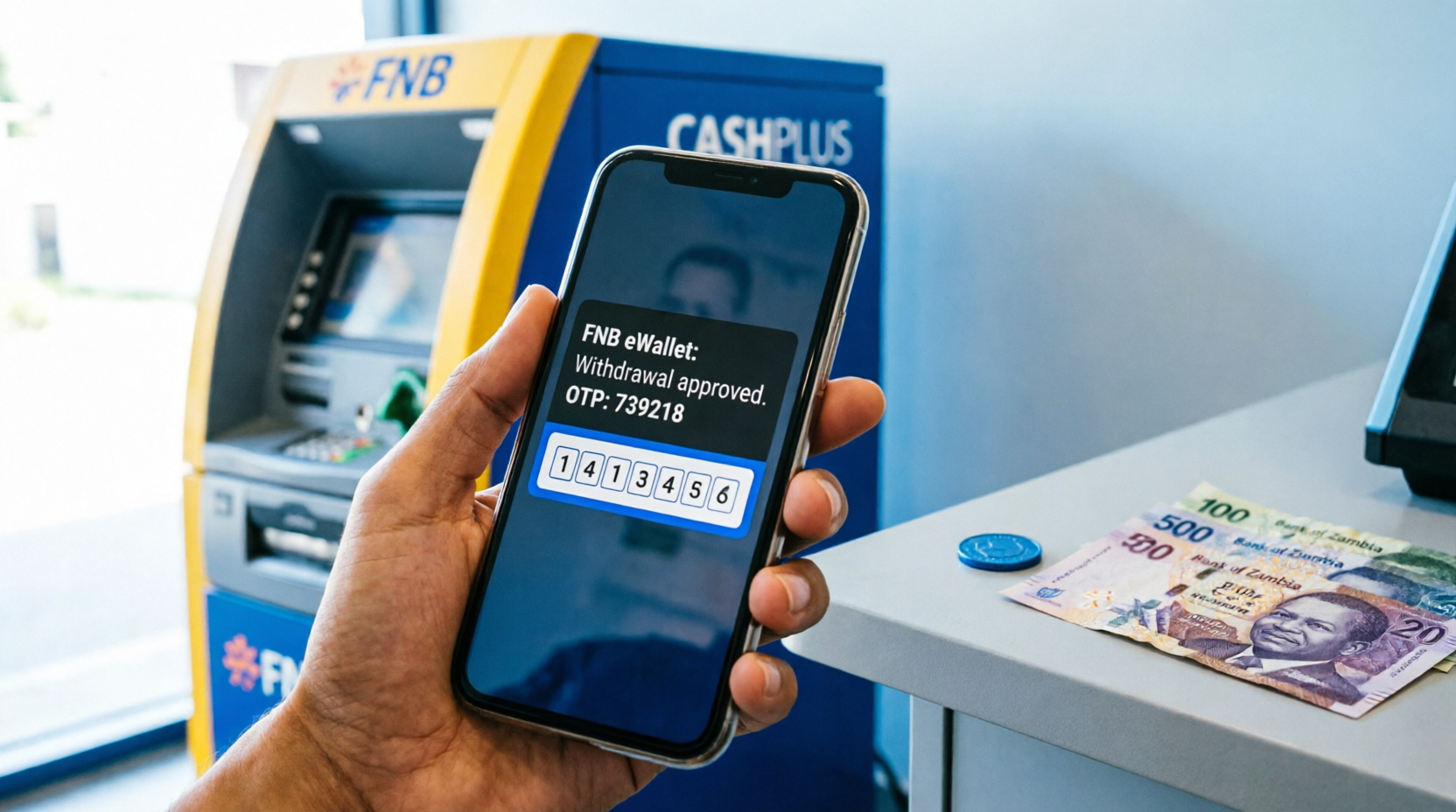
FNB eWallet is a revolutionary mobile money service offered by First National Bank (FNB) Zambia. It is specifically designed to bridge the financial inclusion gap by allowing individuals to send and receive cash directly to and from a mobile phone number. The premise is beautifully simple: the sender initiates a transfer, the recipient receives an SMS notification containing a secure One-Time PIN (OTP), and the recipient uses that PIN to withdraw the physical cash.
Why it actually works for you in the Zambian context:
- Zero Banking Requirements: No bank account, no debit card, and no minimum balance requirements. All you need is an active mobile phone number on any Zambian network (MTN, Airtel, or Zamtel).
- Nationwide Accessibility: You can pull your cash out at almost any FNB ATM, authorized CashPlus agent, or participating retail outlet across Lusaka, the Copperbelt, Southern Province, and beyond.
- Enhanced Security: Transactions are protected by multi-factor authentication, including your personal eWallet PIN and a time-sensitive OTP, drastically reducing the risk of unauthorized access.
- Immediate Availability: Unlike traditional bank transfers that might experience clearing delays, eWallet funds are available for withdrawal the second the SMS arrives.
Why Choose FNB eWallet Over Traditional Banking or Other Mobile Money Services?
While Zambia has a robust mobile money ecosystem dominated by telecom-led services like Airtel Money and MTN MoMo, FNB eWallet holds a unique position. Because it is backed by a licensed commercial bank, it often features higher transaction limits and seamless integration with formal banking systems. For individuals who occasionally need to move larger sums of money but do not want to maintain a full-fledged bank account with monthly ledger fees, eWallet serves as the perfect middle ground. Furthermore, the ability to withdraw at standard ATMs without a physical card provides a level of convenience and security that traditional agent-only networks sometimes struggle to match, especially in high-demand urban areas.
Step-by-Step Guide: How to Actually Get Your Cash Out
Don’t overcomplicate the process. Whether you are in the heart of Lusaka or a rural town, the fundamental steps remain consistent. Just follow these instructions exactly as they are written to ensure a smooth transaction.
Step 1: Fire Up the USSD Code
Grab the exact phone and SIM card that received the eWallet transfer notification. It is crucial that you are using the registered number, as the system ties the OTP to that specific SIM. Dial *130*392# on your phone’s dialer and press the call button. Follow the straightforward menu prompts that appear on your screen.
Step 2: Tell the System You Want Cash
Navigate the menu and select Option 1 – GET CASH. The system will prompt you to enter your secure 4-digit eWallet PIN. Once verified, the system will generate a secure, time-sensitive One-Time PIN (OTP). Keep this code visible on your screen or write it down immediately. You will need to present this exact code to the ATM or agent in the next step. Do not share this code with anyone else.
Step 3: Head to a Withdrawal Point
Walk over to the nearest FNB ATM or an authorized CashPlus Agent. Make sure you have your phone with you, fully charged, as you cannot complete the withdrawal without referencing the active OTP. If you are going to an agent, ensure they have sufficient “float” (cash on hand) to cover your withdrawal amount.
Step 4: Punch in Your Details and Grab Your Cash
If you are at the ATM, look for the Cardless Withdrawal or eWallet option on the main screen. Select it, punch in the phone number that received the funds, enter the OTP when prompted, confirm the amount, and follow the final prompts. The machine will dispense your cash. If you are at an agent, simply provide them with your phone number and the OTP, and they will process the transaction on their till and hand you the cash.
The Retail Store Hack (No ATM? No Problem)
If the nearest ATM is acting up, out of cash, or you’re already at the shops doing your weekly grocery run, you can pull your cash out directly at participating retail outlets. Major retailers like Shoprite, Checkers, Usave, and Pick n Pay often have integrated till systems that support eWallet withdrawals. This is highly convenient as it saves you a dedicated trip to the bank.
Here is exactly how you execute the retail store withdrawal:
- Dial *140*392# on your phone. (Notice this is a different USSD code than the one used for ATMs, specifically designed for merchant till interactions).
- Select the Buy/Get Cash or relevant withdrawal option from the menu.
- Enter the amount you wish to withdraw and your secure PIN.
- The system will generate a till-compatible OTP or reference number.
- Proceed to the cashier at the retail store, inform them you want to withdraw eWallet cash, and hand them your phone to show the code (or read it out loud).
- The cashier will process the reversal on their system, and you will collect your physical cash right there at the checkout counter while you’re doing your shopping.
Look, scammers are always looking for a way in, and financial fraud is a growing concern. Protect your hard-earned money by adhering to these non-negotiable rules:
• Never, ever share your OTP or PIN. Not with your “cousin”, not with “FNB support” calling you unexpectedly, and not with anyone offering to “help” you at the ATM. FNB will never ask for your PIN. If someone asks for it, hang up immediately. It is a scam.
• Shield your PIN. Make sure no one is breathing down your neck or watching your screen when you’re typing your PIN at the ATM or handing your phone to an agent.
• Withdraw it fast. Don’t leave the money sitting in the eWallet for days. Get it out before the code expires, and avoid holding large balances in a mobile wallet long-term.
Understanding FNB eWallet Fees, Limits, and Charges in Zambia
One of the most common questions users have revolves around how much it costs to use the service and how much money they can move. While FNB periodically updates its fee structures in alignment with Bank of Zambia (BoZ) guidelines, understanding the general framework is essential for financial planning.
Withdrawal Fees
Withdrawing your own money should ideally be as cheap as possible. Withdrawing at an FNB ATM is typically the most cost-effective method, often incurring minimal to no fees for standard eWallet withdrawals. Withdrawing via a CashPlus agent or retail till may attract a small convenience fee, which is usually a tiered percentage or flat rate based on the amount being withdrawn. Always confirm the fee with the agent before authorizing the transaction.
Transaction Limits
To comply with national anti-money laundering (AML) regulations, FNB eWallet operates under strict transaction limits:
- Single Transaction Limit: There is a maximum cap on how much can be sent or withdrawn in a single transaction (historically around ZMW 3,000 to ZMW 5,000, though this is subject to regulatory updates).
- Daily Cumulative Limit: The total amount you can withdraw or receive in a single 24-hour period is capped (often around ZMW 10,000 to ZMW 15,000).
- Monthly Limits: There is also a ceiling on the total volume of transactions processed through the wallet in a calendar month.
If you need to move larger amounts, you may need to perform multiple transactions over consecutive days, or consider upgrading to a formal FNB Fusion or Easy Account, which offers significantly higher limits and lower per-transaction fees.
Troubleshooting Common FNB eWallet Withdrawal Issues
Technology and human error mean that things don’t always go perfectly. Here is how to handle the most common headaches without panicking:
- OTP Expired: These security codes are designed to be short-lived (usually 15 to 30 minutes) to prevent fraud. If your code expires, do not panic. Simply dial *130*392# again, navigate to the withdrawal menu, and request a fresh OTP. The funds remain safely in your wallet.
- Wrong Phone Number Entered by Sender: If the sender made a typo and sent the money to the wrong number, the recipient cannot withdraw it without the correct PIN. The sender must immediately contact FNB Customer Care (0211 229 999) to initiate a reversal process. The sooner this is reported, the higher the chance of recovery.
- “Transaction Failed” or “System Error” at ATM: This is often due to temporary network timeouts or the ATM being low on cash. Do not stand there arguing with the machine. Cancel the transaction, wait a few minutes, and try a different ATM, find a CashPlus agent, or use the retail store trick.
- Agent Claims “No Float”: Agents need physical cash on hand to give you your withdrawal. If an agent says they have no float, politely thank them and move to the next agent. You can also check the FNB app or website for a locator tool to find well-stocked agents nearby.
- Lost or Stolen Phone: If your phone is lost or stolen, your immediate priority is to block your SIM card by contacting your mobile network provider (MTN, Airtel, or Zamtel). Once the SIM is blocked, the eWallet cannot be accessed. Subsequently, call FNB to formally report the security incident.
Maximizing Your FNB eWallet Experience: Pro Tips and Tricks
Beyond just withdrawing cash, you can leverage the FNB eWallet ecosystem to make your financial life in Zambia much more efficient.
- Pay Bills Directly: Instead of withdrawing cash just to pay for utilities, use the eWallet menu to pay your ZESCO prepaid tokens, DSTV or GoTV subscriptions, and ZAMPOST services directly. This saves you withdrawal fees and the physical risk of carrying cash.
- Buy Airtime and Data: You can purchase airtime or data bundles for yourself or send them as a gift to other numbers directly from your eWallet balance, often at competitive rates.
- Seamless Upgrades: If you find yourself using the eWallet constantly, visit an FNB branch with your NRC. You can often upgrade your eWallet to a full transactional bank account with minimal paperwork, unlocking debit cards, online banking, and higher limits.
- Keep Your App Updated: If you use the FNB Banking App alongside your eWallet, ensure it is always updated to the latest version to benefit from the latest security patches and feature enhancements.
Frequently Asked Questions (FAQs)
Do I need a bank account to withdraw from FNB eWallet?
Nope. That’s the entire premise and primary benefit of the eWallet service. Anyone with an active mobile phone number on any Zambian network can receive and withdraw funds without ever stepping foot inside a bank branch or opening a formal account.
Can I use any bank’s ATM to withdraw my eWallet cash?
No. For security and system compatibility reasons, you must stick to FNB ATMs or authorized FNB CashPlus agents. Other bank ATMs (like Zanaco, Stanbic, or Absa) will not recognize the eWallet cardless withdrawal protocol and will reject the transaction.
Is there a withdrawal limit, and can I increase it?
Yes, FNB enforces daily and monthly withdrawal limits to comply with Bank of Zambia anti-money laundering regulations. While you cannot arbitrarily increase the eWallet limit yourself, visiting an FNB branch with your NRC to upgrade your profile or link the wallet to a formal bank account can grant you access to higher transaction thresholds.
How long does the OTP remain valid?
The One-Time PIN (OTP) is typically valid for a short window, usually between 15 to 30 minutes, depending on current bank security protocols. This short lifespan is a deliberate security feature to prevent fraud in case your phone is briefly accessed by someone else. If it expires, you can easily generate a new one via the USSD menu.
What happens if the agent takes my money but the transaction fails?
This is a rare but serious issue. Always ensure you receive an SMS confirmation from FNB before handing over cash or authorizing an agent. If a dispute arises, immediately note the agent’s name, location, and till number, and contact FNB Customer Care immediately to log a formal dispute. FNB has mechanisms to reverse fraudulent agent transactions.
Can I send money from my eWallet to a traditional bank account?
Yes, the FNB eWallet menu typically includes an option to “Send to Bank” or “EFT”. This allows you to transfer funds from your eWallet directly into any Zambian bank account. Note that standard electronic funds transfer (EFT) fees and processing times (which can be immediate or take up to 48 hours) will apply.
- Mobile Money Fee Calculator
- Monthly Budget Calculator
- Currency Converter
- PAYE Tax Calculator
Disclaimer
This guide is for general informational and educational purposes only. Calculatorzed is not affiliated with, endorsed by, or connected to First National Bank (FNB) Zambia. USSD codes, withdrawal limits, transaction fees, and retail partnerships are subject to change at the sole discretion of FNB and regulatory bodies. Always verify current procedures, fees, and limits directly with FNB customer care or their official website. We are not responsible for any transaction errors, financial losses, or security breaches resulting from the use of this information.